


freshSingle App: How to Download and Use the Free Dating App
Finding meaningful connections should be simple, welcoming, and open to everyone. With freshSingle, you can meet genuine people without dealing with subscription paywalls. Whether you want to chat with local singles or build international connections, the platform is 100% free with no hidden costs.
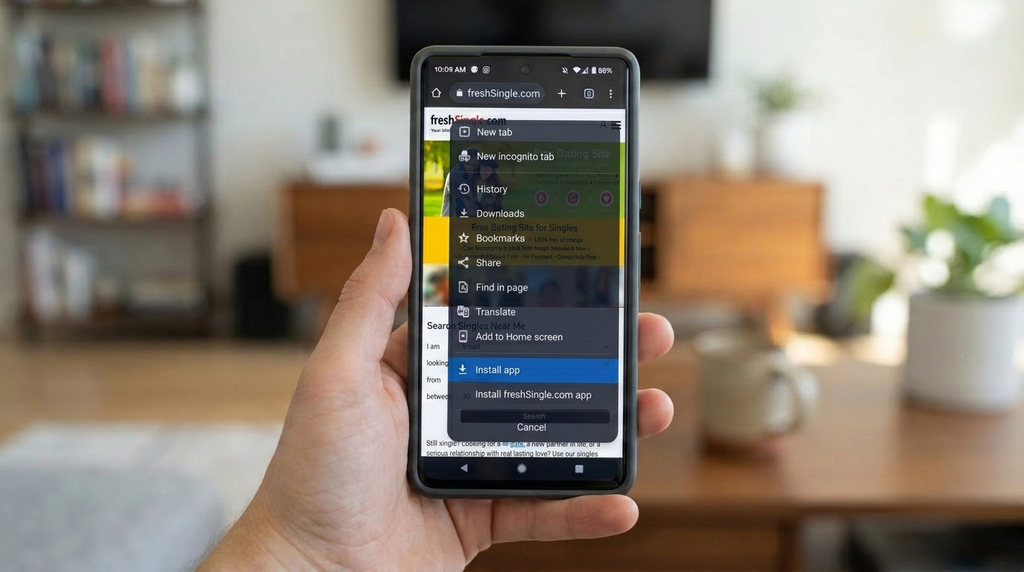
You can enjoy the full experience directly on your mobile device. While you will not find a traditional app store download yet, you can easily install the freshSingle.com dating app as a fast, lightweight Progressive Web App on your smartphone or tablet. Here is everything you need to know about setting up your freshSingle app download and meeting new people today.
What is the freshSingle PWA?
A Progressive Web App gives you the exact feel, speed, and convenience of a native app directly through your web browser. It requires no large file downloads, takes up almost no storage space on your device, and always stays updated automatically.
When you add freshSingle to your home screen, you get quick one-tap access to your singles search, notifications, and your direct messaging system. Best of all, the entire platform remains completely free to use.
How to Install the freshSingle Dating App on Android (Google Chrome)
Setting up the freshsigle app on an Android phone or tablet takes only a few seconds:
- Open Google Chrome on your device and navigate to freshsingle.com.
- Tap the three dots menu icon in the upper right corner of your browser.
- Select Add to Home screen or Install app from the dropdown menu.
- Confirm by tapping Install.
The freshSingle icon will appear right on your home screen and in your app drawer. You can tap it anytime to launch the full-screen dating experience.
How to Install the freshSingle Dating App on iOS (Safari)
If you are using an iPhone or iPad, you can install the platform via Safari with these simple steps:
- Open Safari and visit freshsingle.com.
- Tap the Share button (the square icon with the upward arrow) at the bottom of the screen.
- Scroll down the menu and tap Add to Home Screen.
- Confirm the name and tap Add in the top right corner.
The freshSingle app icon is now saved directly onto your home screen alongside your other apps, ready whenever you want to check your messages.
Getting Started and Finding Your Match
Once installed, using the freshSingle dating app is straightforward:
- Sign up now: Create your free profile in moments and share a few details about your interests.
- Explore the singles search: Discover local singles in your neighborhood or browse international connections worldwide.
- Start a chat: Use the built-in messaging system to send messages and connect freely, with zero subscription fees.
Install the app on your home screen today, start exploring, and find your perfect match.
Frequently Asked Questions
Related Posts


